
Board Game Stats
Apps by EerkoLifestyle
4.8285.00 Reviews
- Version
- 6.12.3
- Installs
- 100.00K
- Age Rating
- Everyone
Screenshots
Our Review of Board Game Stats
 Analysis by Appyee
I tend to think about a board-game session in two parts: the time spent playing and the little details everyone forgets afterward. Who won? Which version did we play? Was that our first game or the fifth? Board Game Stats is built for keeping those details together, and that makes it more useful than a simple collection checklist once a group starts playing regularly. It is a lifestyle app from Apps by Eerko, aimed squarely at people who enjoy tabletop games enough to remember their sessions later.
The app’s appeal depends partly on how you use it. If you only want a reminder of what is on your shelf, a basic list may do the job. If you like comparing plays, recalling who joined a session, or deciding which neglected game deserves another outing, a more detailed record can pay off. I would treat it as a personal log first and a source of conversation second: its value grows as you enter information consistently, rather than appearing all at once on the first day.
What happens when a session depends on a connection?
Connectivity matters most before and after the game, when you are looking up titles, bringing in collection information, or revisiting records. The app can sync with BoardGameGeek, which is especially handy if you already maintain a collection there. That creates a useful bridge between an established online catalogue and a session-tracking routine, though I would not assume every step works the same way regardless of network conditions.
For a game night, I would prepare the collection and any details I expect to need before friends arrive. That is not because the app should replace the table conversation; it is because nobody wants to pause a turn while the group waits for a search or a sync. Once the game is underway, the simplest workflow is to record the session without turning every round into a data-entry exercise. Notes and extra details are most helpful when they answer a question you will genuinely have later.
Board-game groups also vary in how much they want to share. Some enjoy a running record of wins and scores, while others would rather keep the focus on the game. Player profiles and session history can suit the first kind of group, but they are not a reason to make every casual gathering feel competitive. I would agree with friends on what to record, especially if the group includes people who do not care about standings.
Using it at the table, at home, and on the move
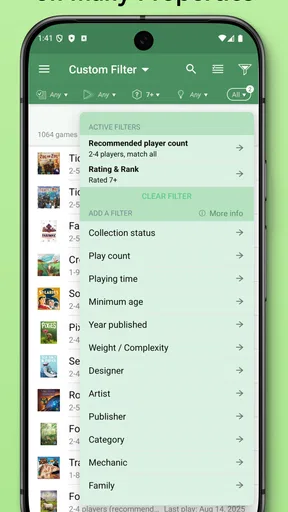
The mobile format is a natural fit for a collection that lives in several places: games on a shelf, titles borrowed from a friend, and ideas on a wish list. You can search the app’s database or enter obscure games manually, then sort your collection by details such as playtime, player count, or how often you have played. That makes the app useful not only when you are seated at home but also when you are trying to choose a game for a particular group.
A practical example: I might be heading to a friend’s place and want to suggest something that suits the time we have and the number of people coming. A collection organized by playtime and player count is more useful in that moment than a long, unsorted list. Afterward, a quick session record can help me remember the result and whether the game landed well with that group. The key is to keep the record light enough that it does not compete with the social part of the evening.
There is a trade-off between a complete catalogue and a usable one. Adding every expansion, note, and play detail can make the record richer, but it also means more maintenance. I would start with the games I actually play, then add older or rarely used titles when I need them. That keeps the first setup manageable and avoids turning a hobby tool into another list that needs constant upkeep.
When details fail to load or memories are incomplete
Any app that connects with an external catalogue can involve a little uncertainty in the workflow: a title may need manual entry, or a detail may be easier to add later than during a busy session. Board Game Stats allows manual entry for less common titles, which is a sensible fallback when searching does not give you the result you want. I would use that option rather than letting one missing catalogue entry stop me from recording a game night.
For the same reason, I would avoid trying to reconstruct a perfect history in one sitting. Start with the collection you can identify confidently and log new sessions as they happen. If you are unsure about an old score or who played, leaving that record out is better than creating a misleading history. The useful habit is a reliable recent log, not a complete archive assembled from guesswork.
Before relying on any connected feature during a group event, it is sensible to check that the information you need is already available. If a connection is slow or a lookup is inconvenient, the table can keep moving and the record can wait until afterward. That is a practical boundary: this app is a companion to play, not something I would make the game night depend on.
Organizing Your Game Collection
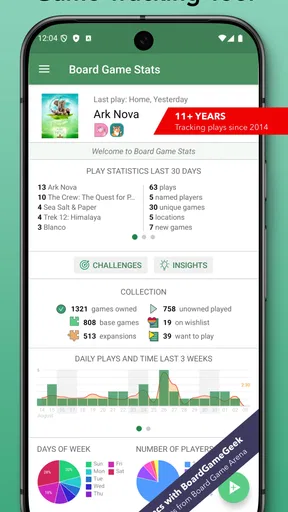
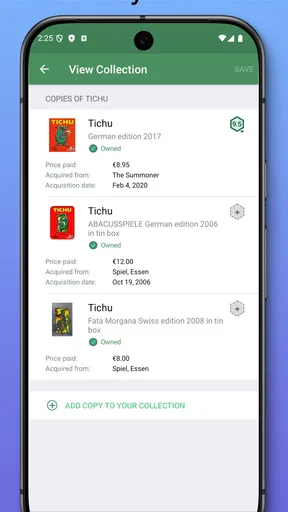
The first thing that struck me about Board Game Stats is how effortlessly it lets you organize your game collection. With a few taps, you can catalog all your games, whether they're snug in your closet or on your wish list. The app syncs beautifully with BoardGameGeek, so if you've already been active there, your data can be imported without a hitch. I personally found this feature a lifesaver since my board game collection is kind of a beast!
Adding games to your collection is straightforward. You can either search for them in the app’s database or manually enter details for more obscure titles. I loved how the app lets you categorize and sort your games by various parameters like playtime, player count, or even by how often you've played them.
Tracking Plays and Scores
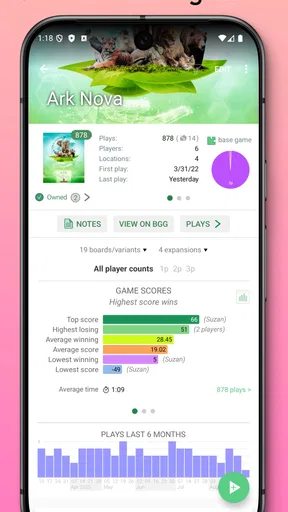
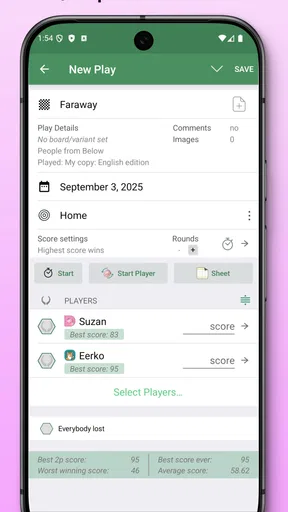
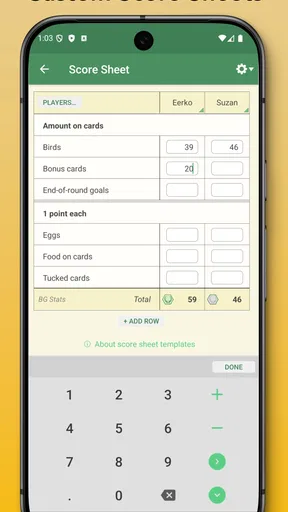
Now, let’s talk about one of the coolest features—tracking your plays. For someone who enjoys revisiting games, having a record of past plays is invaluable. You can log each gaming session, noting who played, the scores, what strategies were used, and even personal notes about the game. This makes it fun to look back and see how your gameplay has evolved over time.
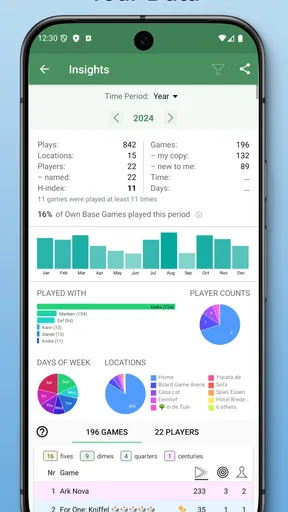
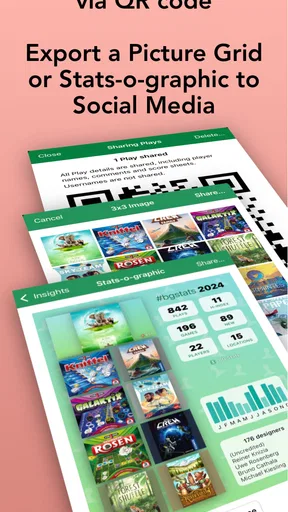
Moreover, you can analyze your gaming stats with neat charts and graphs. It’s like having a personal gaming historian. I found it fascinating to see which games I’ve played the most and which ones are gathering dust.
Enhancing Social Play
The social aspect of board gaming is where Board Game Stats really shines. You can create player profiles for your gaming buddies and track their scores and achievements as well. It’s a friendly way to stir up some healthy competition. Plus, the app’s ability to handle multiple players and game sessions means you’ll never have to fuss over who won that last epic game night.
Another neat feature is the ability to record game locations. So next time you’re arguing about who hosted the last game night, you’ve got the facts at your fingertips!
Customization and User Interface
Let’s get into the nitty-gritty of the app’s design. The user interface is clean and intuitive, making navigation a breeze. I appreciated the customizable settings that let me tailor the app to my preferences. You can choose what stats to prioritize or adjust the themes, allowing for a personalized experience.
The app also provides a smooth dark mode, which is easy on the eyes during late-night gaming sessions. It's one of those small touches that make a big difference.
Choosing it over simpler alternatives
Compared with a notes app, a spreadsheet, or a paper notebook, this tool is designed around board-game collections and plays rather than general-purpose record keeping. That focus is its advantage: collection details, player records, scores, and play history belong in the same place. A spreadsheet may be better if you want complete control over columns and formulas, and paper may be better if you want zero screen time at the table. I would choose this app when I want the records to be easy to revisit and compare, not when I need a fully custom database.
The most useful habit is to decide on a small amount of information to record every time. For example, logging the game, players, and result gives you a consistent history; adding strategy notes only when something stands out keeps the process from becoming a chore. You can then use the charts and records to spot patterns without needing every session to be documented in exhaustive detail. That balance is more sustainable than trying to capture everything from the first play.
Who will get the most from it
I think it suits a regular game group, a collector who wants to know which boxes actually reach the table, or a player who enjoys looking back at scores and session notes. It can also help when a group rotates hosts: recording locations gives you a factual reminder of where sessions took place. People who play only occasionally or do not care about stats may find the setup and ongoing logging more effort than the benefit warrants. If your main goal is simply to pick a game for tonight, a short shelf list may be enough.
The app is priced at $5.99, with optional in-app purchases ranging from $0.99 to $15.99 per item. I would think about that cost in terms of how often I expect to use the record-keeping tools. Someone who logs plays throughout the year may value having the history in one place; someone who opens it only a handful of times may be happier with a free note-taking method. It is rated for Everyone, and it has a 4.8 average from around 2.5 thousand ratings, which suggests it has found an audience among tabletop players, though a strong rating cannot tell you whether its workflow fits your habits.
Version, access, and a sensible routine
The current version is 6.12.3, and the app runs on Android 6.0 or later. It has been available since June 23, 2017, and has passed 100 thousand installs. I would still check that a device meets the minimum system requirement before planning to use it on game night. The developer is Apps by Eerko, and those details place it as a long-running, focused companion rather than a general lifestyle organizer.
One question people often have is whether they must already use BoardGameGeek. The integration is helpful if you do, but the option to search within the app or add less common games manually makes the collection workflow useful without relying on an existing catalogue there. Another practical question is whether every player needs to maintain their own record. The described player-profile approach lets one person keep track of friends’ scores and sessions, so a group can try the habit without asking everyone to manage a separate log.
For a smoother routine, I would add games gradually, set up familiar player names before a gathering, and record the essentials while the result is fresh. If a session gets lively and nobody wants to pause, jotting down the winner or score somewhere temporary and entering it afterward is a reasonable compromise. Just avoid treating that temporary note as a substitute for a regular record if you care about comparisons over time.
Customization and User Interface
Let’s get into the nitty-gritty of the app’s design. The user interface is clean and intuitive, making navigation a breeze. I appreciated the customizable settings that let me tailor the app to my preferences. You can choose what stats to prioritize or adjust the themes, allowing for a personalized experience.
The app also provides a smooth dark mode, which is easy on the eyes during late-night gaming sessions. It's one of those small touches that make a big difference.
The Verdict
In conclusion, Board Game Stats is a fantastic tool for anyone serious about their board games. It keeps your collection organized, tracks your plays with precision, and adds a layer of fun to gaming nights with friends. Whether you're a casual player or a board game aficionado, this app is worth every penny.
So, if you’re looking to level up your board gaming experience, give Board Game Stats a try. You might just find yourself playing more games, keeping better track of your scores, and maybe even winning that next big game night!
My connectivity verdict is simple: I would use it to maintain a useful history, but I would not make the session itself depend on a live lookup or sync. Prepare what you can, keep play moving, and fill in details when convenient. That makes the app a stronger fit for a regular tabletop group than for someone who wants a completely hands-off collection list. Its best payoff comes from a small, repeatable habit—recording enough to remember what happened, without letting the record become more important than the game.
Verdict
Strengths of Board Game Stats
- Intuitive interface for easy navigation.
- Supports a wide range of board games.
- Detailed stats tracking for analysis.
- Customizable notifications for reminders.
- Syncs data across multiple devices.
Limitations of Board Game Stats
- Requires internet for full functionality.
- Subscription needed for advanced features.
- Initial setup can be time-consuming.
- Limited offline capabilities.
- No dark mode for night use.
Similar Picks in This Category
View All
SmartThings
Samsung Electronics Co., Ltd.4.6

Google Home
Google LLC4.0

Pinterest4.2

Astrotalk - Talk to Astrologer
Astrology & Horoscope4.7

My Verizon
Verizon Consumer Group4.5

Samsung Wallet (Samsung Pay)
Samsung Electronics Co., Ltd.4.1
Frequently Asked Questions
What is Board Game Stats and how does it enhance my gaming experience?
Board Game Stats is an app designed to track your board game plays and scores, providing detailed insights into your gaming habits. It enhances your experience by allowing you to see patterns in your gameplay, track progress over time, and even compete with friends. It’s perfect for avid board gamers who love data and analytics.
Can I sync Board Game Stats with other platforms or services?
Yes, Board Game Stats can be synced with BoardGameGeek, a popular platform for board game enthusiasts. This integration allows you to import your game collection, log plays, and access detailed game information seamlessly. It’s a great feature for those who are already using BoardGameGeek to manage their board game data.
Is Board Game Stats user-friendly for those who aren't tech-savvy?
Board Game Stats is designed with a clean, intuitive interface that is easy to navigate, even for users who aren’t tech-savvy. The app provides clear instructions and helpful tips, making it accessible for all levels of users. Whether you’re a beginner or an experienced gamer, you’ll find it easy to track your games.
Does Board Game Stats require an internet connection to function?
While Board Game Stats can be used offline to log plays and scores, an internet connection is necessary for syncing data with BoardGameGeek and accessing some online features. However, the core functionalities of tracking and managing your game sessions can be performed without internet access.
Are there any in-app purchases or subscription fees with Board Game Stats?
Board Game Stats offers a free version with basic features, but to unlock its full potential, you may need to purchase additional features or a subscription. These include advanced statistics, cloud sync, and more. The app ensures that even without purchases, users can still enjoy a robust set of features.
